
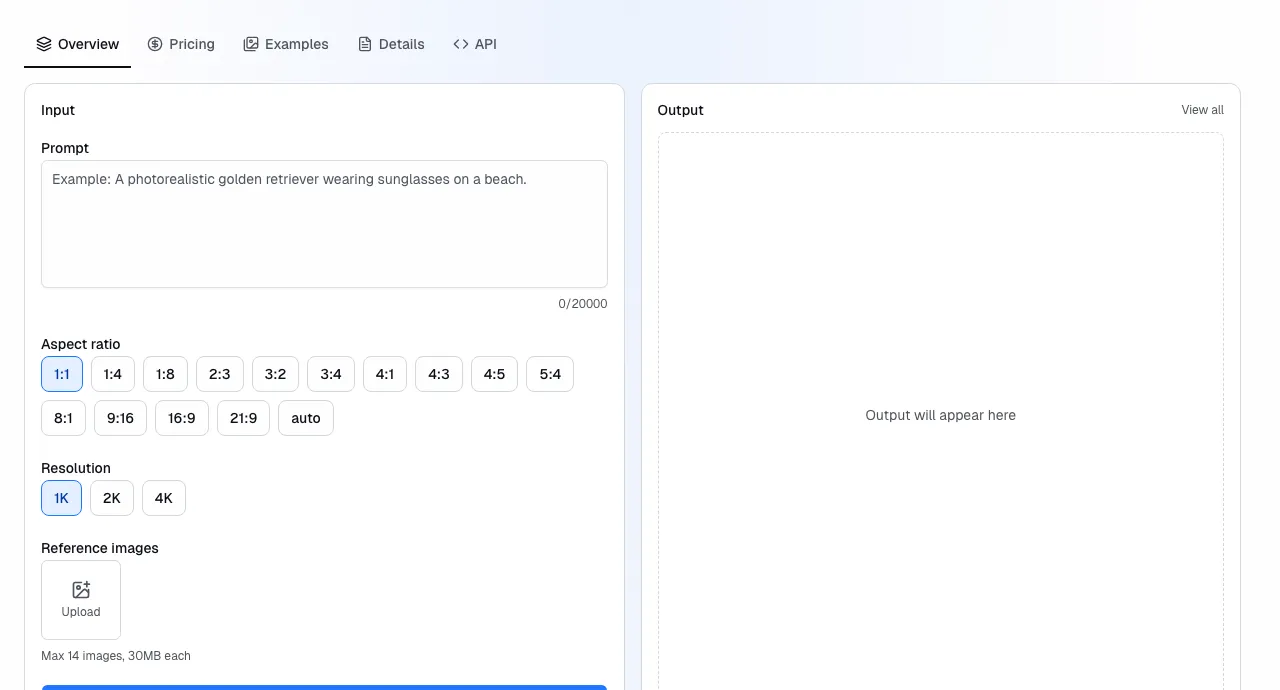
Every model on Runbase has a built-in Playground on its detail page. You can generate images and videos right in your browser without writing any code or setting up API keys.
How to use
- Go to the Models page and pick a model
- On the model's detail page, you'll see the Playground section at the top
- Enter a prompt, adjust parameters if needed, and click Run model
- The result appears in seconds — images display inline, videos play directly
You need to be signed in to run generations. Each run deducts from your balance, just like API calls.
When to use the Playground
- Evaluating models — compare output quality across different models before choosing one for your project
- Testing prompts — experiment with prompt wording, styles, and parameters to see what works best
- Quick one-off generations — grab an image or video without writing code
- Demos — show stakeholders what the models can do
Model parameters
Each model has different input parameters. The Playground form shows all available options for the selected model:
- Prompt — text description of what you want to generate (required for all models)
- Aspect ratio — output dimensions like 1:1, 16:9, 9:16
- Quality — generation quality tier (where supported)
- Reference images — upload or link reference images for style transfer or image editing (where supported)
The exact parameters vary by model — the form adapts automatically.
From Playground to API
When you're ready to integrate, the API tab on the same model page has the request format, input schema, and copy-ready code samples. The model ID and input object match exactly what the Playground uses.
For the full integration walkthrough, see the Quickstart guide.